The Certified School Librarian Is and As a Curriculum Partner

Of the 5 facets of a certified School Librarian--experienced teacher, curriculum integration partner, information specialist, program manager, education leader--the role of curriculum partner is the most challenging. | No Sweat LibraryThe 5 facets of a certified School Librarian offer a useful organizational paradigm for understanding why this educator is needed in every school. This series of blog posts examines those five rolesexperienced teacher, curriculum integration partner, information specialist, program manager, and education leader—to elaborate on each one and to offer how we can best fulfill each role.

The first post of the series examined that most important role of experienced teacher. In this next post of the series, we explore what I consider the second most essential role: the certified School Librarian is and as a curriculum integration partner.

THE CERTIFIED SCHOOL LIBRARIAN IS A CURRICULUM PARTNER

Our teaching certificate and years of experience help us successfully work with teachers, but there’s more! The certified School Librarian knows every subject’s curriculum and their national and state curriculum standards. We don’t have the depth of knowledge that teachers do, but we know the breadth of all subject curricula through all grade levels so we perceive when to approach teachers for a collaborative opportunity.

The certified School Librarian can fully incorporate library resources, services, and instruction with classroom activities because we glean what students are studying that could bring them to the library, and then we determine which library skills students need to know in order to do what the teacher expects them to accomplish.

The Certified School Librarian has a broad knowledge of the entire school's curricula which enables them to successfully work with teachers to plan authentic Library Lessons that support and enhance classroom learning. | No Sweat LibraryWith this background knowledge, the certified School Librarian can plan Library Lessons:

  • that are based on each subject’s curricular Standards and educational best practices.
  • that are scaffolded to build knowledge and skills.
  • that use high-quality resources in print and digital forms.
  • that seamlessly introduce new media and technologies.
  • that have meaningful activities to practice learning.
  • that will increase student achievement.

While we can’t impose lessons on teachers, we show them how we can enhance existing classroom activities with what we deem students need, and we guide teachers toward infusing their projects with more student-centered inquiry. We work with them to teach the processes of learning while they teach the content, and we provide the best available resources so their content area teaching results in successful learning for all students.

Other blog posts that address the certified School Librarian’s role as a curriculum integration partner.
5 Essential Literacies for Students: Part 2 Content Area Literacy – The certified School Librarian integrates reading, writing, thinking, and communication skills specific to each discipline’s vocabulary, concepts, and methods.
To Teach Critical Thinking & Inquiry Learning, Entrust Your School Librarian – The certified School Librarian is an authority on critical thinking, because our Information Literacy curriculum is all about analyzing, evaluating, inferencing, synthesizing, and communicating complex information in multiple formats.
School Librarians: Show Teachers Their National Standards Require Student Research – At least 46 National Standards for middle school subjects require or align with students doing research assignments.

THE CERTIFIED SCHOOL LIBRARIAN AS A CURRICULUM PARTNER

Ideally, the certified School Librarian and the classroom teacher are a team that works together to contribute to student achievement, yet seemingly this partnership is the hardest one for us to actualize. One obstacle is on us, and the second obstacle is with teachers. I’ve found solutions to both of these obstacles.

THE LIBRARY LESSON CURRICULUM MATRIX

Being a curriculum guru sounds easy, but it’s hard to know which library lessons to teach and when and to whom. Since most of us come from a single-subject teaching experience, we need spend time examining every other subject area curriculum to discern what students are learning in their classes that might benefit from a Library Lesson that builds on that classroom experience.
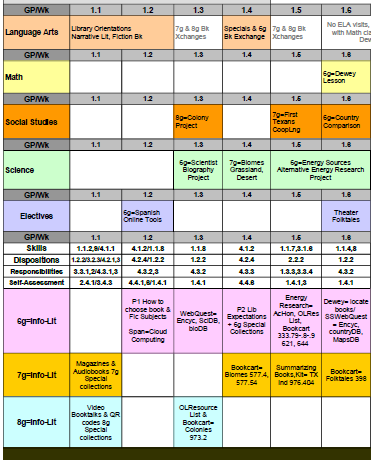
My Library Lesson Curriculum Matrix - Composite example of an older version for the 1st grading period.

click to enlarge

To keep track of these possibilities, I created a visual organizer—a set of spreadsheets—that I call my “Library Lesson Curriculum Matrix.” This unique tool also helps me develop continuity for Information Literacy skills among sporadic lessons scattered between a variety of subjects and across grade levels.

At the start of a grading period I check my Matrix to see which teachers have upcoming lesson opportunities. Then, for a few minutes during their conference/planning periods, I go to their classrooms with my Library Lesson Curriculum Matrix to schedule a library visit.
Cover image of the Library Curriculum Matrix product available from the No Sweat Library store on Teachers Pay Teachers. The School Library Lesson Curriculum Matrix is available through No Sweat Library, my TeachersPayTeachers store.

THE SCHOOL LIBRARY LESSON PLANNER

Teachers who understand the benefits of collaborating with the School Librarian are in the minority, so how to convince them to accept a lesson and bring classes to the library is the second obstacle. We must show them that our library lesson is tied to their subject standards, is relevant to what their students are studying in the classroom, and has students producing something relevant and meaningful.

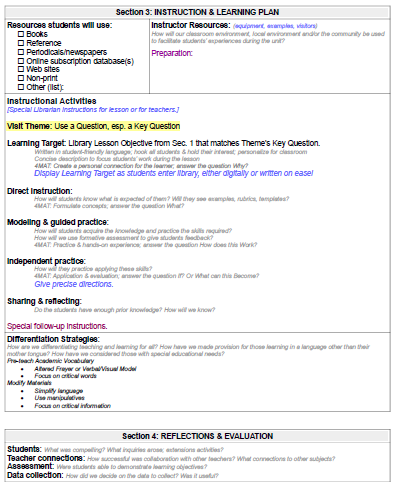
This FREE School Library Lesson Planner is customized to the needs of the School Librarian. Each step builds upon the prior foundation to produce a meaningful and authentic lesson. | No Sweat LibraryWhen visiting teachers for prospective lessons, I bring the Library Lesson Plan I’ve generated for their proposed library visit or project. Yes, Library Lesson Plan. If we want teachers to regard us as a teaching professional, we need to show them a lesson plan that fully incorporates what they are doing in their classroom.

The visual planner makes teachers more willing to collaborate with me … and it’s even more compelling if I create a sample of the library activity (or screen-shot of technology) so they can see what students will be doing. That extra step nearly always clinches the teachers accepting a library lesson visit.

The School Library Lesson Planner is a FREE download from my FREE Librarian Resources page.

TEACHING EXAMPLES & INSPIRATION FOR YOU

Here are a few ways to implement classroom learning into library visits:

Here are successful collaboration lessons that are available in No Sweat Library, my Teachers Pay Teachers store.

Library Lessons Bundle: Doing Dewey Decimals with Math

Math teachers were thrilled when I approached them to visit the library for a review of decimals at the start of their unit! The collaboration resulted in these 2 lessons that are much more fun—and revealing—than a pre-test. 6g has a simple book locating activity for recognizing decimal sequencing. 7g adds & subtracts decimals then locates books that match the answer.

School Librarians can make Dewey Decimal Lessons more authentic and relevant by inviting 6th & 7th grade Math classes to the library to review prior knowledge before the start of their decimal unit. Teachers LOVE these Library Lessons so much that they will come to you every year asking when you'll schedule their visits! | No Sweat Library

Comparing Multicultural Cinderella Fairy Tales to Support 6g ELA

This is the first lesson in a completely collaborative unit that is also co-taught by ELA teacher and School Librarian. Students review plot elements through an interspersed read-aloud of the original Perrault Cinderella story. For their activity student pairs read an alternate cultural rendition of the story, and compare/contrast cultural elements (studied in Social Studies World Cultures) using a double-bubble graphic organizer.

Students know the Cinderella story, but examining its story elements through an interspersed read-aloud gives it new meaning. Students then read other cultural renditions of the story, and make comparisons to identify the diversity of cultural elements. | No Sweat Library

Library Orientation Lesson – Viewing Video Book Trailers with 8th grade ELA

This collaboration with 8g ELA is both a library orientation and an introduction to students’ first ELA project. The lesson has students use their own Smartphones to scan QR codes linked to video book trailers, which inspires them for creating their own.

Library Orientation Lesson: Viewing Video Book Trailers with 8th grade rejuvenates student passion for the School Library. This group activity using Smartphones to scan QR codes linked to video book trailers gets students excited to do their own video booktalks about the books they'll read. | No Sweat Library

The certified School Librarian‘s second most compelling endeavor needs to be as a curriculum integration partner with the teachers in our building. Yet, we do have other important roles to perform. Read the next blog post in this series, which looks at the certified School Librarian Is and As an Information Specialist.

line of books laying down - indicates end of blog article

Join my mailing list to get a brief email about new posts on library lessons & management. You'll also gain access to my exclusive e-Group Library of FREE downloadable resources!

3 (more) Strategies for a New School Librarian

For a New School Librarian, here are 3 more strategies to help you: using a FREE Library Lesson Planner for every visit, having the Public Librarian visit during the year, and simple classroom management strategies that worked for me. | No Sweat LibraryPreviously I offered 3 Strategies for a First-Time School Librarian: learn everything, listen to everyone, and leave things as they are. Today I want to share 3 more strategies for a New School Librarian that focus specifically on Library Lessons and visits:

  1. use the FREE No Sweat Library Lesson Planner Template
  2. partner with your local Public Library’s Youth Services Librarian
  3. follow simple Classroom Management Procedures to handle the larger learning space and student groups.

THE NO SWEAT LIBRARY LESSON PLANNER

When we become a School Librarian we don’t stop being a Teacher, in fact, we take on a larger responsibility: teaching all five essential literacies by integrating them into all school subject areas. This becomes difficult as we move from classroom teacher to school librarian because we won’t see students day after day for continuous lessons. I’ve written about how to use the No Sweat Library Curriculum Matrix to track our curriculum standards, but for any library visit, the typical lesson planner used by classroom instructors is unsuitable for planning library lessons.

Create better School Library Lessons with my No Sweat Library Lesson Planner Template that starts with Subject Content & National School Library Standards. Developed from the "best" of the best...and it's FREE! | No Sweat LibrarySay what? Yes, a lesson plan for library visits. I learned pretty quickly, that if I wanted the principal and teachers to regard me as a teaching professional, I needed to have a formal lesson plan for the lessons I taught. After a few years of trying various forms with limited success, I’ve combined the best of them to create my No Sweat Library Lesson Planner Template. The organization of my lesson planner keeps me focused on supporting what students are studying in their classroom so I avoid anything that does not achieve the purpose of the library visit.

To that end my Library Lesson Planner begins with Subject area Content Standards and then AASL National School Library Standards; it includes understandings, key questions, objectives, and performance tasks for both subject and info-lit. It also follows the AASL-recommended instructional model for presenting a lesson. This may seem like a lot of work for a single lesson, but taking time for detailed planning—maybe more time than the actual lesson takes—makes a better lesson.

Habitually using my Library Lesson Planner has made me a better teacher and librarian, and I’m convinced it will help a New School Librarian, too.

LibTip: I’m a big fan of graphic organizers as learning aids for student success, thus my lessons usually have some sort of graphic worksheet. I use many types for lessons and support classroom learning by using many of my teachers’ forms. Teachers LOVE graphic organizers for library visits; not only does it hold kids accountable for what they need to be doing, but it also gives teachers the concrete evidence they need as a daily grade for students when visiting the library.

PARTNER WITH THE PUBLIC LIBRARY YOUTH LIBRARIAN

public library marqueeOne of the most valuable steps a New School Librarian can take is to establish a partnership with the Youth Services Librarian at the local Public Library. Have this colleague visit your library several times during the school year and they will provide Library Lessons that you don’t have to create. I’m fortunate that our school boundaries include 2 cities with wonderful Youth Librarians who love to visit our school.

I have the Public Librarian give Booktalks because I don’t do them very well. They can be sure-fire “lessons” for you, too. Students—even reluctant readers—sit, rapt with attention, as our ladies do 8-10 booktalks in a single class period. They feature the most popular books that they have more copies of than our school library; according to them, their circulation always goes up for a couple weeks after their visit to our school. Here are the visits and booktalks I arrange with my Public Library Youth Librarians:Collaborative Summer Reading Program Bookmark Teen 2020 - Collaborative Summer Reading Program Bookmark Teen 2020 - Visit https://www.cslpreads.org/ for more information.

  1. September is Library Card Sign-Up Month so at this first visit they show students how they can get public library services both in-house and online, and then they booktalk new releases over the summer.
  2. December marks the announcement of our State Reading Lists, so at this visit they booktalk the books for middle school and pass out flyers of public library activities taking place during the school’s coming winter break.
  3. March is our spring break, so they visit beforehand to talk about their public library activities during March and in April for School Library Month and National Library Week. I ask them to give booktalks on something unique, such as their extensive collection of graphic novels or informational books on popular age-appropriate topics.
  4. May‘s visit features summer reading activities at the Public Library to entice kids to visit throughout the summer, so their booktalks align with the theme of our State Summer Reading Program. I schedule this visit the second week of May because that’s the final due date for all our school library books, and promoting the public libraries at this time encourages kids to visit them to check out new books.

Establish this booktalking partnership with the Public Library Youth Librarians during your first year as a New School Librarian so you can focus on other pressing needs without sacrificing the needs of your students.

LIBRARY CLASSROOM MANAGEMENT

I'm a pitiful classroom manager, but these 5 strategies really saved me...and they may help first-time new School Librarians, too! | No Sweat LibraryMoving from classroom to library has unique challenges, one of which is establishing behavior management procedures for students entering, leaving, and being in the library. It’s important to establish a procedure for entering the library because it sets the tone for the rest of the visit.

I explain to all teachers that, when they bring students to the library, students enter, sit down, and wait quietly for me to begin the visit. I emphasize to students that the procedure applies to any library visit, with any teacher, for any purpose.

Teachers respect that the library is my classroom and I need to direct activities. Even if there’s no lesson and I return to my desk, like during testing, I still need students seated to settle them into the room and welcome them to the library. I never have a single teacher disagree—especially with our hormonal middle schoolers.

(If a class comes in a bit unruly, I stop them at the door, have them line up in the hallway and invite them to re-enter the library in the proper way; I only need to do it once or twice before they get the picture!)

I’m actually a pitiful classroom manager, so the following procedures helped me with even large groups of even 60+ students. I printed them out and taped them to my presentation station so I’m always reminded of what I need to be doing. I hope these four tips to help you present your Library Lessons will result in a receptive student audience:

  1. Stand still when you’re giving directions (don’t do 2 things at once).
    Be specific about what to do (what to have on the tables, what not to have; thank them as they complete task).
    linebreak
  2. Correct misbehavior with the positive expectation, not the negative wrong. “Thanks for behavior that meets expectations.” (Don’t praise—that’s a value judgment for what’s truly special or exceeds expectations.)
    linebreak
  3. Control should be for purpose, not power. Step outside of your own head. (“We don’t do that in the library because it keeps us from making the most of our learning time.”)
    linebreak
  4. Go from student who gets it wrong to students who get it right, then back to student who gets it wrong; ask a follow-up question to make sure they understand why they got it wrong and why the right answer is right.

REMEMBER THE PURPOSE OF LIBRARY LESSONS

I’m convinced that the purpose of our School Library Lessons is to teach students only what they need at that time, and those lessons need to make things easier for students, not harder or more confusing. Here’s a final bit of counsel for the New School Librarian:

The rigor in a school library must be the academic purpose for visiting the library, not rules about how to use the library
The challenge in our library must be the content in the materials, not in trying to find the materials.

Updated 2025.
line of books laying down - indicates end of blog article

Join my mailing list to get a brief email about new posts on library lessons & management. You'll also gain access to my exclusive e-Group Library of FREE downloadable resources!