How to Model Digital Literacy & Technology Tools with Students

It's crucial for educators to use technology tools correctly when we deliver a lesson to students. Here are some best practices I model to build digital literacy, and a lesson that integrates technology in order to increase student engagement and enhance their end product. | No Sweat LibraryModeling is the second step in the AASL-recommended lesson sequence, so it’s importance is evident. But I wonder if most educators realize how we present lessons is as important as the content, especially when using technology.

Students do as we do (model), not as we say. We can’t expect them to build digital literacy and technology competency unless we properly model it. Here are some practices I use when sharing tech with students, along with a lesson that integrates technology in order to enhance a student product and increase student engagement.

PROPERLY MODELING SLIDE PRESENTATIONS

I believe it’s crucial for educators to model technology correctly when delivering a lesson. If we read text off a slide during presentations, we aren’t modeling or presenting the material properly. In fact, we’re actually interfering with the students’ reading of the text instead of creating a powerful image of a concept in their mind.

Lee Hilyer, profile photoI learned the best way to do slide presentations from Lee Hilyer, University of Houston librarian, in a webinar** sponsored by the Texas Library Association. His 3 simple rules are:

  1. Say the words – create a script of what you want to say
  2. Show the pictures – use relevant images that fill the slide
  3. Text is for take-away – minimize slide text and expand on the topic with a handout

So how does one put that into action? Here’s what I do:

  1. I create a script for each slide using the “Notes” feature of the slide application, then later I print them out as prompts to use during the presentation.
  2. I limit text on slides and use visual representations that cement concepts into students’ minds. I also try to keep a presentation under a dozen slides because students won’t pay attention nor remember more than that.
  3. My take-away is the students’ guided or independent practice activity sheet, which is also their daily grade for the library visit.

Hilyer also recommends standing to the left of the screen so students use their natural left-to-right reading pattern to see us first, then the slide. To facilitate that, I use a remote control to advance slides; it also allows me to move around, as needed. (Having two remotes allows students to use one during their own presentations.)

I know many educators think that providing text on a slide allows students to take notes during the presentation, but brain research shows that is not the best way for students to learn. Learning happens much better when we pair our speaking with highly engaging visuals and provide students a guided notetaking sheet or graphic organizer on which to record their understanding. Give students a short time after the presentation to compare notes so they all have the pertinent information.

Download a FREE PDF of my notes summary for Lee Hilyer’s webinar

When we present improved lessons, students intuit the most engaging way to create their own slide presentations. Students see so many slideshows in their other classes, that it’s easy to ‘tune out’ in the larger library classroom, so I limit slideshows to a few critical slides for my Library Lessons. Students also occasionally enjoy a short, auto-timed narrated slide show—perhaps it’s more like a video—so I sometimes do that to vary direct instruction. Yes, slide presentations are the standard in education, but if I can find a better way to instruct than slideshows, I do so.

PROPERLY MODELING ONLINE TECH TOOLS

I believe it’s crucial for school librarians to uphold the rules we expect students to follow regarding the use of online services. With under-age-13 students it’s imperative to use in-house applications or online services provided by the state or district for digital and technology lessons.

It is illegal for public or commercial services to require accounts for under-age students, so it would be irresponsible, unethical, and illegal for any educator to suggest students lie about their birth year to secure an online account, so…just don’t! If a public or commercial tool is the only option for the activity, find and use one that doesn’t require students to create an account.

Keep in mind that some technology projects require the use of multiple apps to accomplish them, like creating screencasts with one tool or videos with a different tool, and needing a YouTube account to which we can upload them. We may need to create a school account for under-13 students, and upload projects ourselves so students aren’t tempted to create illegal accounts. Careful evaluation of tools and the grade levels with which to use them with is how we model good digital citizenship for students and for our teachers.

The Teacher’s Guide to Tech, an online encyclopedia of tech tools written by teachers, for teachers. Tons of useful features. Works on all devices. Over 750 Tools curated into in 50+ Categories To help you browse quickly. | A Cult of Pedagogy product.I am impelled to suggest my favorite “tech tool” for finding and choosing appropriate technology: The Teacher’s Guide to Tech, produced by Jennifer Gonzalez and her Cult of Pedagogy tech team. It is hands-down the best catalog around of tools for educators.

INTRODUCING A NEW TECH TOOL

School Librarians are often the most tech-savvy person in the building, so we frequently are the person initiating use of a new tech tool. To decide with whom I’ll present a new tool, I ask myself 2 questions:

  1. What subject or curriculum standard will this tool best support?
  2. Who is my most accommodating teacher of this Subject?

Once I’ve answered these questions, I use my Library Lesson Planner to create a lesson and show it to the teacher during their planning period. They are often, coincidentally, looking for something to “refresh” the lesson, unit, or activity, and greet my well-prepared tech lesson suggestion with enthusiasm. I offer to show them how to use the tool before the visit and they’re usually eager to try it out, so they can help students during the lesson and when they’re back in the classroom.
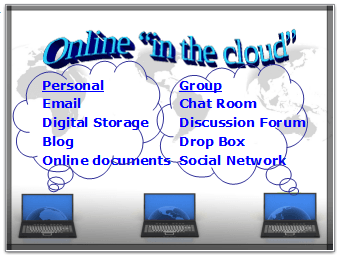
Cloud Computing Slide Sample

During the lesson I only need 2 animated slides to introduce the digital literacy concept, the type and purpose of the technology tool, and its form of audience interaction. Since the best way to teach technology is to demonstrate how to use it, I close the slides and open the online service.
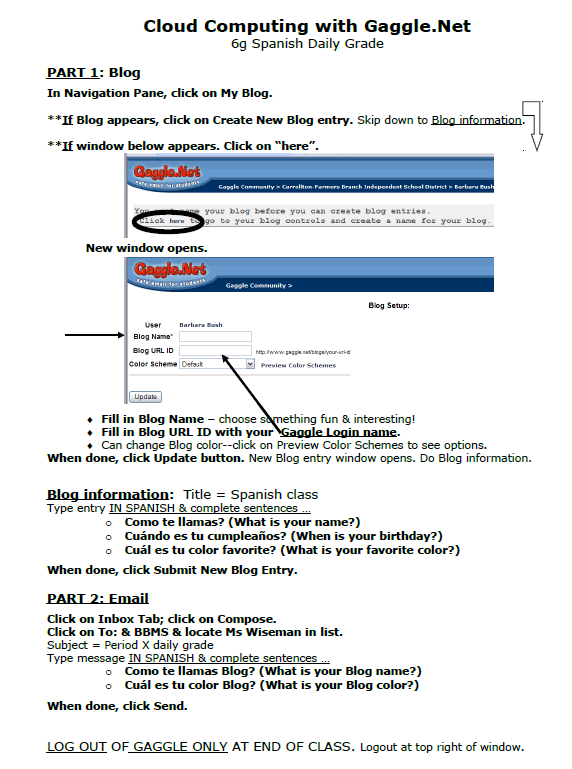
Tech Lesson Worksheet Example

I have students take a handout from a stack on the table which has tool images to help them follow the demonstration. Students use the rest of the period for a daily grade activity that guides them into features the teacher wants them to use for the assignment.

Once students are introduced to a service, they often ask other teachers to give them assignments using it. The teachers come to me for help, and I’m able to expand student use of the service through short integration lessons during library visits with those other Subjects.

To keep Digital Literacy concepts fresh in students’ minds, I print out and laminate chosen slides from lessons as educational signage and display them near library computers. I use clear, acrylic, letter-sized sign holders, wall-mounted and free-standing, so I can change signs to highlight particular elements I’m presenting. The signs are reminders which activate and reinforce terminology, concepts and processes, and legal and ethical responsibilities. Teachers like them, too, and they had me mount some of the holders on the walls in their computer spines.

A TECHNOLOGY-ENHANCED PROJECT

School Librarians can make learning digital literacy more engaging with a Library Lesson that integrates technology into 3 different subject classes! | No Sweat LibrarySometimes a project can be done without technology, but technology makes the project more authentic and meaningful. Such is the case with the Dream Vacation Project. This is a true multidisciplinary project with Social Studies, Math, and ELA that is an authentic and meaningful use of online resources and apps.

    • The initial library visit is with Social Studies classes to Investigate a country. I present a problem-solving model and our online subscription services, and students browse maps and information on geography, climate, main cities, and natural wonders so they can decide which country they want to choose for their “dream vacation.”
      linebreak
    • A few days later Math classes visit to Plan the Dream Vacation within the allocated budget amount they can spend on their trip. I introduce an online Resource Link List for the project. There are links to travel service providers where I show them how to find the cost of air flights, hotels, and ground transportation.
      linebreak
      There are also links to tourist & travel bureaus which give popular tourist destinations and prices for tours. Since student budgets are in dollars, my Resource List provides currency conversion websites so they can calculate and keep track of trip costs.
      linebreak
    • The following week English Language Arts classes visit the library for the Create phase of the problem-solving model. I remind students about Academic Honesty and citing text and images, then show them how to Create a Webpage to present their project in one of two ways:
      • as a travel agent promoting a Dream Vacation for clients, or
      • as a tourist who is sharing experiences from their Dream Vacation.

      Teachers distribute a checklist of product requirements and an assessment rubric, which I also have on the project’s online Resource List.

    • At the end of the project I load Student Webpages to our school website. During ELA classes students use computer spines or the library to view their class’s site and, with a rubric, they Evaluate the Dream Vacations.

Using multiple technology tools makes this project more authentic, more exciting, and more successful for students, especially since they receive credit in three different subjects for one product. I incorporate several Information Literacy components into the project, and I can adapt it to other grade-level Social Studies classes by having the vacationer visit destinations in our state or across the U.S.

**Acknowledgments to Lee Hilyer of University of Houston for permission to use information from his TLA Webinar.

line of books laying down - indicates end of blog article

Updated 2026.Join my mailing list to get a brief email about new posts on library lessons & management. You'll also gain access to my exclusive e-Group Library of FREE downloadable resources!

5 Essential Literacies for Students: Part 2 Content Area Literacy

Our students need to be proficient in 5 Essential Literacies and School Librarians can incorporate a Library Literacy component into any class visit. In Part 2 we look at ways to integrate Content Area/Disciplinary Literacy into Library Lessons with subject areas. | No Sweat LibraryIn our complex, information-rich, culturally diverse world, literacy is no longer just knowing how to read and write. Students need to understand and be proficient in multiple literacies to be successful in our global society. As School Librarians, we have a responsibility to inculcate these Five Essential Literacies into our students:

  1. Reading and Writing (the original literacy)
  2. Content Area/Disciplinary Literacy (content & thinking specific to a discipline)
  3. Information Literacy (the traditional library curriculum)
  4. Digital Literacy (how and when to use various technologies)
  5. Media Literacy (published works—encompasses all other literacies)

My previous blog post covered Part 1 Reading, so this post looks at Content Area or Disciplinary Literacy, with suggestions and examples on how to integrate this literacy into lessons.

DEFINING CONTENT AREA/DISCIPLINARY LITERACY

LiD 6-12 (Literacy in the Disciplines, Grades 6-12) distinguishes the difference between the broader and more specific terms:

  • content area literacy (CAL): content-neutral strategies and tools used to support students in attaining knowledge of the content—the “how” of teaching;
  • disciplinary literacy (DL): the knowledge, skills, language, discourse, practices, and habits of mind contextualized to and specific within the subject areas—the “what” of teaching.

Our National School Library Standards embrace the more specific disciplinary approach with this definition of one of its 5 specific literacies:

Visual literacy: ability to understand and use images, including the ability to think, learn, and express oneself in terms of images i.e. charts, graphs, maps, etc.)

So Content Area Literacy is related to reading literacy—being able to structurally analyze subject area text to read proficiently and learn concepts. But School Librarians are in a unique position to construct lessons that take this a step further so students understand each discipline’s specific vocabulary, concepts, and methods. Disciplinary Literacy means reading, writing, thinking, and communicating like a scientist, or a mathematician, or an historian, or a musician, or an artist.

INTEGRATE DISCIPLINARY LITERACY

When I simplified my Library Orientations with ELA classes to focus solely on reading, it opened up opportunities for other content-area visits. I could create specific content-related lessons where students would learn library skills in context and apply what they learned. My Subject-area teachers see the value in these Library Lessons and are amenable for more lessons as the year progresses. They share the positive experience with others, who are then motivated to collaborate with me. Here are 5 examples of how I integrate disciplinary thinking for various subject areas into my Library Lessons.

Do Dewey Decimal Numbers with Math Classes

My observations suggest that students struggle with understanding Dewey Decimal Classification in a meaningful way, so why not invite Math classes to the library since that’s where decimals are studied? Learning about how the library uses decimals gives them a curricular reason to visit, especially with a hands-on activity that practices identifying and applying decimal numbers.

Give Math classes a curricular reason to visit the library by identifying and using decimals. School Librarians can include a hands-on activity that practices using Dewey Decimal numbered book locations. | No Sweat LibraryMy students love coming to the library with their Math class—it’s new and different so they’re excited. Math teachers like the fun, non-graded review where they can see which students are having trouble with decimals, and they actually come to me to schedule their class visit!

My middle school Dewey Decimal Library Lessons teach Math students how decimals are used in the library while activating prior knowledge for their upcoming decimal unit. The activity has them solve decimal problems to locate decimal-numbered books, because what’s important about DDC is teaching students how to USE it, not memorize it.

  • "Why is my Math Class coming to the School Library?" This lesson gives an authentic and relevant reason to invite 6th grade Math classes to the library, and is loved by students and teachers alike. | No Sweat LibraryMy 6g Dewey Library Lesson reviews decimal number place values and sequencing decimals to prepare students for learning to add and subtract decimals. I begin by telling students that when we get a new book in the library, we ask, “What is this book about?” and the answer determines the Dewey number we assign to the book. We review how each place of a decimal number has a certain value—hundreds, tens, ones, tenths, hundredths, thousandths. Likewise for the library, each place has a value: a subject or topic of knowledge. As we move from left to right, each number denotes a more specific sub-topic of the one before it.
     a
  • Make Dewey Decimals more authentic and relevant when 7th grade Math classes review adding and subtracting decimal numbers. Students and teachers LOVE this Library Lesson so much, teachers come to you asking to schedule their visit! | No Sweat LibraryMy 7g Dewey Library Lesson reviews adding and subtracting decimals to prepare students for learning to multiply and divide decimals. The hands-on activity for this lesson does take some preparation, but it’s worth it to see student partners scurrying around the library to locate their Dewey-number books and having a wonderful time…in a Math class! And it always increases checkout of Dewey books for quite some time after the lesson because students have been able to see how topical books are grouped together so they can find their favorites.
     a
  • Even elementary students who have not learned decimals can put numbers in order:
    • For the itty-bitties, create picture cards that match Dewey Subject shelf signs and put a corresponding 3-digit-only Dewey number on the back. Distribute them on tables and have students pick a favorite Subject from their table, then use the number on the back to find a book on the shelf with that number.
    • To help older elementary students understand that there are two parts to a Dewey number, create one color of cards with 3 numbers and a different color of cards with a big dot and 1 or 2 numbers to the right of the dot. Students pair the cards, then find the Dewey Number on the shelf. They learn that each side of a decimal is in separate numerical order, and that’s how you find the numbers on the shelves.

Because my Dewey Lessons focus only on recognizing and locating Dewey numbers, students also grasp that Dewey numbers listed next to search results in the online catalog tell them exactly where to locate the book on a shelf.

Use Content-area Class Visits to Explore Dewey Subjects

Examining Dewey Subjects through Content-area lessons is better than a generic standalone Dewey Decimal lesson because the integrated lessons support and enhance classroom learning so it is more deeply remembered.

For example, Science classes study the organization and classification of living organisms, and Dewey’s Science Numbers follow that same disciplinary structure. My Library Lesson helps students make a visible association between the Science content and the Dewey Decimal bookshelf organization which reinforces their learning of the discipline’s vocabulary and content, and increases their library skills. I wrote about this lesson in a blog post, and another post explains geography and Dewey organization of 900s countries as another opportunity to integrate library skills into a subject content lesson.

Introduce Online Databases with Science & Social Studies

School Librarian social media posts often have lesson requests for teaching online subscription database services. Such lessons only have value when they are integrated into a subject’s current classroom activities. For example, early in the school year I have a WebQuest lesson with Science classes during which I introduce an online encyclopedia and two databases that have the specific information students need to complete their current classroom assignment. Shortly thereafter, I have a WebQuest lesson with Social Studies classes where I use the same encyclopedia (activating and applying prior knowledge) with two different databases for students to complete their assignment on world explorers.

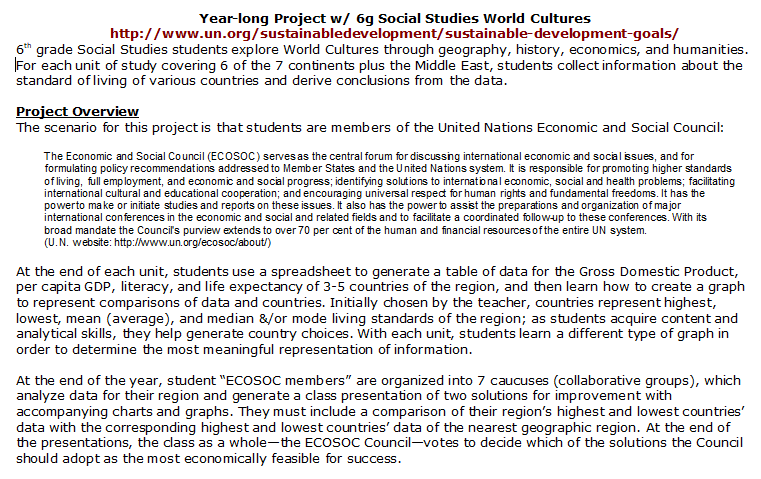
Develop content area/disciplinary literacy in Social Studies with a project that uses world statistics from online sources to create different graphs, then culminate the year with a UN economic symposium. | No Sweat LibraryA yearlong set of periodic lessons with 6g World Cultures helps students gradually develop disciplinary literacy in Social Studies. At the first lesson I introduce an online subscription service from which students find demographic statistics of countries in their current unit and record this information into a digital spreadsheet. I teach them how the spreadsheet can create a graph comparing one demographic across countries. At subsequent visits, students add new countries and statistics to their spreadsheet, and learn to create a new kind of graph. Throughout the school year students are learning to think like economic analysts(This also has great technology integration.) 

Year-long project for Social Studies World Cultures Classes

Click to enlarge

The culmination of this long-term lesson is an authentic activity where students act as “members” of the United Nations Economic and Social Council (www.un.org/ecosoc/), whose goal, according to their website, is to “conduct cutting-edge analysis, agree on global norms, and advocate for…solutions” to advance sustainable development. During this final library visit, student groups analyze their spreadsheets and graphs, choose a country, then collaborate on a presentation about why that country is most in need of developmental support from the U.N. At the end of presentations, all student “members” vote on which country the U.N. should support. This Library Lesson furthers disciplinary literacy along with critical thinking and cooperative learning skills.

Disciplinary Literacy and Project Based Learning

6g Science classes visit our Outdoor Learning Center during their ecology unit to conduct various environmental analyses. As a culminating activity students participate in a 3-day Science Symposium. In their science classrooms, small group Workshops compare and consolidate their gathered data. Next day, classes meet in the library for the Conference where groups use data to analyze the environmental impact of building a factory on empty land adjoining the OLC property. They create a presentation on why the proposal should be approved or not. The last day is the Plenary Session when a spokesperson for each group makes their presentation. Students vote for a “Recommendation to the City” on whether to grant permission to build the factory. This is an example of helping students think like scientists and build Disciplinary Literacy that they’ll need to be successful with coursework and with future decision-making as citizens.

In 7th grade Social Studies & English Language Arts we’ve made a dull immigration project and a so-so personal narrative into an authentic interdisciplinary project“My Texas Heritage—How and Why I’m in Texas” has students learn the history of themselves the same way they learn the history of our State. It gives students a sense of identity (important for middle schoolers) and provides a personal understanding of conceptual factors that have brought people into the state.

As the School Librarian I teach research skills with a variety of primary and secondary sources, both in print and online—biographies, speeches, letters, diaries, songs, and artwork. In ELA they learn how to interview family members in person and through written requests. In Social Studies they learn to discern similarities and differences between historical events and the lives of their own family.

Texas Visual History clippingStudents are offered two product options to share their project learning. They can create concise, well-written webpages to share information with family members, which I add to our School Library Website. This option forces them to thoroughly think through and edit responses to their research questions. As the second option, students who share common events can group together for mock newscasts of “eyewitness” accounts, which I broadcast through our internal video system. With this option, students discern that historical “truths” often depend on one’s point of view—a valuable lesson for studying history. This project develops multiple disciplinary literacies as students learn to think like historians, journalists, webmasters, and newscasters.

SCHOOL LIBRARIANS & CURRICULUM INTEGRATION

It is apparent to me that the only way we School Librarians can integrate Content Area/Disciplinary Literacy into our Library Lessons is to become very familiar with the curriculum taught by our teachers. When we take to them a lesson plan that fully incorporates what they are doing in their classroom, they will be more willing to collaborate with us, knowing that the library visit is not only essential for learning the Subject-area’s content, but also for helping students think according to that Discipline.

This is the second entry in my series of blog posts on the 5 Essential Literacies for Students. I invite readers to offer comments and suggestions about any or all of these literacies.

line of books laying down - indicates end of blog article

Updated 2025.Join my mailing list to get a brief email about new posts on library lessons & management. You'll also gain access to my exclusive e-Group Library of FREE downloadable resources!